


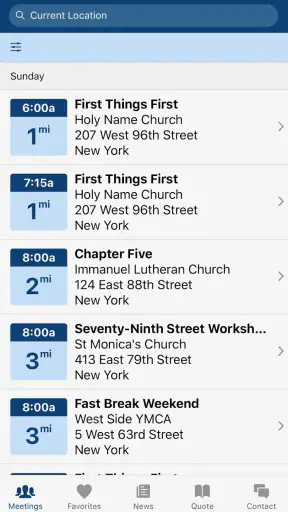
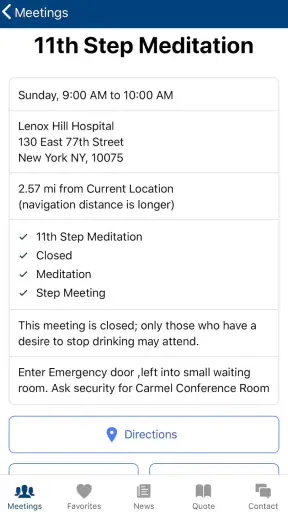

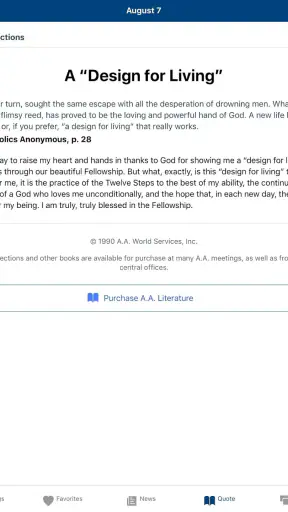
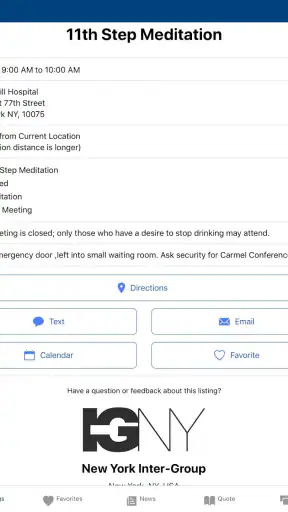
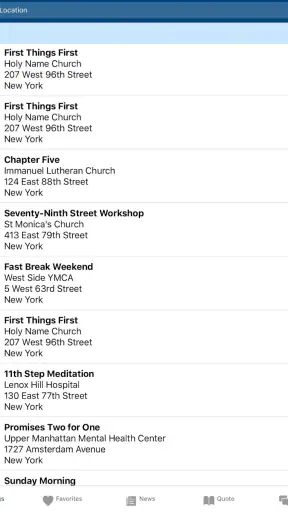
I found Meeting Guide most useful when I treated it as a practical household reference rather than as a general wellness app. It is designed to make Alcoholics Anonymous meeting information easier to reach, and that narrow purpose is also its biggest strength. Instead of asking a family member to search the web while feeling stressed or trying to remember a meeting location from an old message, I could open the app and begin looking for relevant information in a more direct way.
That makes it especially suitable for a shared phone or tablet in a household where one person may occasionally help another find a meeting. The app is free, comes from A.A. World Services, Inc., and has an Everyone age rating. Those details make it approachable in a family setting, although the person using it should still understand that a shared device can expose searches or recently viewed information to other people who use that device.
How Meeting Guide fits into everyday household use
A realistic situation would be a household member deciding late in the day that attending a meeting might help. Another person may be driving, caring for children, or simply trying to offer support without taking over the decision. In that moment, the app is useful because it gives the helper a focused tool instead of turning the conversation into a long search through unrelated websites, maps, social posts, and old contact details.
I also like the fact that the app keeps the task clear. It is not trying to replace a recovery program, act as a counselor, or become a social network. Its role is finding meeting information in an easy-to-access format. That limited role can be reassuring: someone who wants practical direction can use it without navigating a large collection of distracting features.
On a shared device, I would use it with a simple boundary. The person asking for help should decide whether they want someone else to search, and they should remain in control of which meeting information is acted on. A partner, parent, roommate, or friend can help with the practical steps, but the app itself should not become a way to monitor another adult’s recovery choices.
This distinction matters because a meeting finder is helpful when it reduces friction, but uncomfortable when it is used as evidence-gathering. I would not use it to check where another person might be going without their knowledge. The app works best as a tool offered openly: “Would you like me to help find a meeting?” That approach respects privacy while still making support concrete.
What the first use feels like
The first session is relatively easy to understand because the purpose is so specific. I did not need to learn a complicated content system before getting value from it. The important task is reaching meeting information, so I could focus on location and timing rather than building a profile or filling out a long personal questionnaire.
For a person who is already overwhelmed, that simplicity is valuable. A stressed user may not want inspirational articles, streaks, badges, or a lesson plan. They may simply want to know what options are available. The app’s focused design makes it better suited to that immediate need than many broader health or lifestyle apps.
There is still a practical limitation: the quality of the experience depends on the meeting information being useful for the user’s situation. A search tool can point someone toward options, but it does not remove the need to check the details before leaving home. Schedules and locations can change, and a result that looks suitable on a screen may not fit a person’s transport, accessibility, privacy, or comfort needs.
My advice is to treat the displayed information as a starting point for coordination, not as permission to assume every detail. If the meeting is important enough to justify a trip, the user should take a moment to confirm the time and place through the available meeting information or another trusted local source.
Setting boundaries on a shared phone or tablet
Meeting Guide does not need to be installed on every device in a household. If one person is the main user, keeping it on that person’s own phone may be the most respectful arrangement. A shared tablet can be convenient when a family member is helping with directions or planning, but it also creates a visibility issue: other people may see the app, searches, or meeting details later.
I would decide in advance who can open the app and what kind of help is welcome. One useful arrangement is for a trusted person to help with the practical search while the individual chooses the final option. Another is to keep the app available on a personal device and only use a shared screen when the user explicitly asks for assistance.
This is not about making the app seem secretive. It is about recognizing that recovery-related information can be personal even when the app itself is rated for Everyone. An age rating describes general suitability; it does not tell a household how to handle private conversations or shared-device visibility.
There is also a boundary around notifications and interruptions. I would avoid turning a meeting search into a family announcement, especially around children or visiting relatives. A quiet, one-to-one offer of help is usually more considerate than discussing the search in front of everyone. The app can support coordination, but the household still needs good judgment about when and where that coordination happens.
Coordinating transport, timing, and practical support
The most useful way I found to use the app with another person was to separate information gathering from transportation planning. First, we looked for a meeting option. Then we discussed how the person would get there, whether they wanted company, and what would happen if the chosen option no longer worked. This prevented the app from becoming a rushed decision-making tool.
That workflow is particularly helpful when the user does not drive or when a household shares one vehicle. The app may help identify a possible meeting, while the family handles the real-world questions around departure time, pickup, parking, and return. Those are not glamorous details, but they often determine whether a plan is realistic.
I would also avoid assuming that the nearest meeting is automatically the best one. Distance is only one factor. A user may prefer a particular time, a setting that feels comfortable, or an option that works better with work and childcare. The app is strongest when it expands awareness of available choices, not when it is used to pressure someone into the first result.
A helpful habit is to save the practical details in a neutral way only if the user wants that. For example, a household member might write down the selected time and location separately so that the person attending does not have to repeat the search while getting ready. I would not create a shared calendar entry or message thread without asking first, because visible reminders can feel supportive to one person and exposing to another.
Another trade-off is that the app can make coordination faster, but it cannot judge the emotional readiness of the person using it. If someone is uncertain, the right response may be patience rather than immediately arranging transport. I see the app as a bridge from intention to practical information, not as a substitute for listening.
Age context, trust, and responsible help
The Everyone rating makes the app broadly suitable for households with different ages, but I would still guide younger users carefully. A teenager might use a family device to look for information for a parent or another adult. In that case, the child should not be placed in charge of the adult’s recovery or expected to manage sensitive logistics alone.
For younger family members, the healthiest role is usually limited and clear: help open the app, pass along information to a trusted adult, or assist with a simple practical task. Adults should handle decisions, transportation arrangements, and conversations that may be emotionally difficult. The app can make information accessible, but it should not shift adult responsibility onto a child.
Trust is equally important between adults. If a partner installs the app for someone else, I would ask before doing so and explain what it is for. Installing a recovery-related app secretly could damage trust even if the intention is caring. A better approach is to offer it as an option and let the intended user decide whether it belongs on a personal or shared device.
I also would not treat the app’s presence as proof that someone is attending meetings or making a particular choice. An app can be opened for many reasons: curiosity, helping a friend, checking information for someone else, or planning ahead. Household members should avoid drawing conclusions from app activity alone.
For a user who wants confidential emotional support, professional guidance, or urgent assistance, this app may not be enough by itself. Its value is practical and informational. Someone facing an immediate crisis should seek appropriate emergency or professional help rather than assuming a meeting finder can handle every need.
Where it stands beside usual alternatives
The obvious alternative is a general web search. That can work, especially for someone who already knows a local organization or wants to compare information from several sources. However, a broad search often mixes official meeting details with outdated pages, unrelated results, and general recovery content. Meeting Guide feels more focused because the user opens it with one central task in mind.
Another alternative is relying on a friend’s saved contact, an old printed list, or a message from a previous meeting. Those methods can be useful backups, but they are easy to outgrow when schedules or locations change. The app is more convenient for checking current options than searching through old conversations.
On the other hand, a map app may be better for the final travel stage. Maps are designed for route planning, traffic, and navigation, while Meeting Guide is designed around meeting information. I would use the two tools together when necessary: use the meeting app to identify a suitable option, then use the device’s normal navigation tools to work out how to get there.
A broader recovery app may be a better choice for someone seeking journaling, daily reflections, progress tracking, or a larger personal support toolkit. Meeting Guide is not the right pick if the main goal is an all-in-one recovery companion. Its advantage is that it does not bury the meeting-search task under unrelated features.
That narrow focus also means the app may feel too limited for users who want extensive explanations or a guided introduction to recovery concepts. I would recommend it to someone who already understands why they are looking for an A.A. meeting, or to a trusted helper who needs a practical way to find information. I would not present it as a complete answer to someone asking for counseling, diagnosis, or a personalized recovery plan.
Useful details for regular users
One non-obvious strength is how well the app can support a two-step routine: search first, discuss second. Instead of browsing together indefinitely, one person can gather a small set of possible options and then let the intended attendee choose. This keeps the conversation manageable and avoids making the user defend why one meeting feels preferable to another.
A second useful insight is to search before the need becomes urgent. A household might look at meeting information during a calm moment, identify the kinds of times and locations that are workable, and understand the basic routine before a difficult evening arrives. That preparation does not commit anyone to attending; it simply removes one layer of uncertainty.
A third trade-off concerns device ownership. A shared device improves convenience when someone needs hands-on help, but a personal device gives the user more control over privacy and timing. I would choose the personal-device setup for an adult who values discretion, and the shared-device setup only when the household has openly agreed on how it will be used.
It is also worth checking the app’s version before judging an older installation. The current version is 5.1.14, and the app requires Android 7.0 or later. That makes the operating-system requirement relevant for older phones and tablets. If the app is being installed on a spare household device, I would check compatibility first rather than waiting until the moment someone needs it.
The app has been available since June 17, 2018, and its reach suggests that it is not an obscure experiment: it has more than a million installs, with a 4.6 average from around 5.2 thousand ratings and roughly 1.6 thousand written reviews. I mention that only as context for confidence in its role, not as a reason to assume it will fit every local situation or every household routine.
My household verdict
After using it as a meeting-information tool, I would recommend Meeting Guide to adults who want a straightforward way to look for A.A. meetings, and to trusted household members who have been invited to help with that search. It is free, focused, and easier to approach than a general web hunt when the immediate need is practical information.
My recommendation comes with a clear condition: use it with consent and realistic expectations. Keep the person seeking support in charge of the decision, confirm important details before traveling, and avoid treating shared-device activity as something to monitor. Those habits make the app more useful and protect the trust that matters far more than convenience.
I would skip it as a primary choice if I wanted therapy tools, detailed educational content, personal tracking, or navigation features. In those situations, a professional service, a broader recovery resource, or a standard map application may be a better companion. But for its specific job, the best reason to keep Meeting Guide available is that it turns a vague request for help into a manageable next step.
For a household, that is a modest but meaningful benefit. The app does not solve the personal work behind recovery, and it should not be used to control another person. It simply makes meeting information easier to reach when someone is ready to look. In my experience, that focused purpose is exactly why it earns a place on a personal phone or a carefully managed shared device.


